
If you need advanced shipping options, using your PayPal shipping settings is the way to go. Here are step by step instructions on using your PayPal Shipping Settings.
1. Login to your store Head Quarters
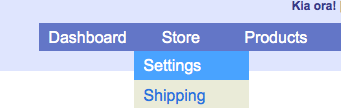
2. Navigate to “Store” -> “Settings”
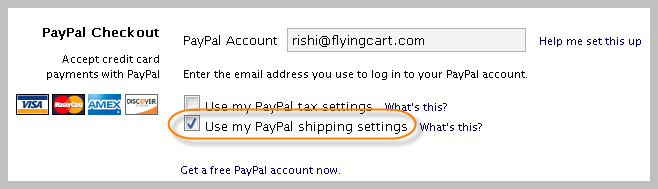
3. Scroll down the page to the “PayPal Checkout” section and select “Use my PayPal shipping settings”
4. Click “Update Settings” at the bottom of the page.
5. Login to your PayPal account
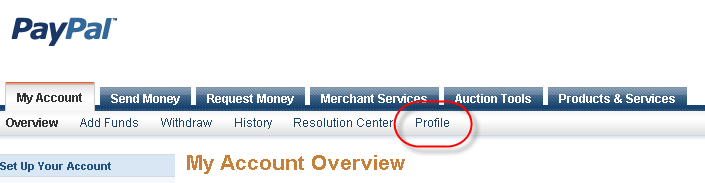
6. Click on “Profile”
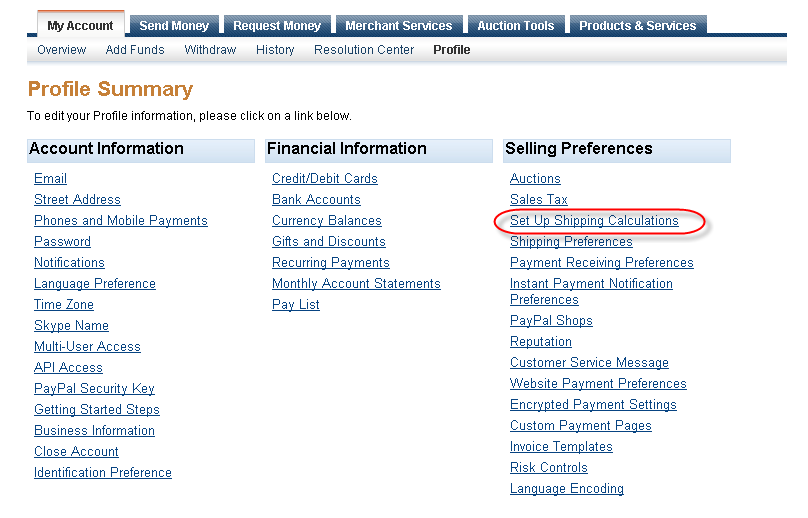
7. Click “Setup Shipping Calculations”
8. Follow the PayPal setup instructions to setup your shipping settings
–
Please Note: If you are using Google Checkout and/or PayPal Express your PayPal Shipping settings will not be applied when a customer makes a purchase via Google Checkout or PayPal Express. We highly reccommend deleting all Google Checkout and PayPal Express information on your store settings page. Your customers will still be able to pay with PayPal or any major credit card.
[...] PayPal Override Shipping Instructions [...]
US Store: Online Shop for all products from top brands….
[...]How do I use PayPal Shipping Settings? | Tips for Creating an Online Store[...]…
For individuals like my, working and residing abroad along with small contact around the world except for the web, your site is gold for us, we are able to maintain updated as well as follow the information by way of your excellent weblog, keep up the good work as well as tell me if I can perform something for you!
Hey your website url: http://flyingcart.com/blog/how-do-i-use-paypal-shipping-settings/ seems to be redirecting to a completely
different web site when I click the home page link. You may want to
have this checked.