Socci isn’t soccer. A very different game that is no contact and the goal is more like a basket hoop.
Here is some Socci in action.
Socci isn’t soccer. A very different game that is no contact and the goal is more like a basket hoop.
Here is some Socci in action.
Accessorize yourself when you dance with your hips!
In an effort to become financially self-sufficient, Budi and Peggy have a vision to start a banana farm that will generate income for the orphanage. The goal is to plant 1000 banana trees, and in 2 years time, if all goes well, there will be a harvest of bananas all year long.
Check them out at the Roslin Orphanage Virtual Giving Store.
This is really cute.
Centaurs is a place to find vintage clothing, plush toys, records, vhs and much more!
1. Login to you 1 and 1 account and click on “Administration”.

2. Click on “Manage Domains”.

3. Check the box next to the domain you want to setup.

4. Select “Edit DNS Settings” under the “DNS” drop down

5. Select the “CNAME” option, enter in “stores.flyingcart.com” next to the Alias, click the checkbox at the bottom, and click “Ok” at the bottom to save.

6. Login to your Flying Cart store headquarters
7. Navigate to the Store -> Settings tab and locate the “Website Address” section on the page
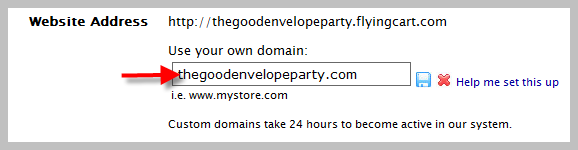
8. Type in your domain name under “Use your own domain:”
9. Hit the “Update Settings” button towards the bottom.

“My name is Justin; I am 17 years old and I’ve always had a true love for fashion. So it was only natural that I decided to take it one step further by creating a select line of t-shirts and accessories” – JustINstyle
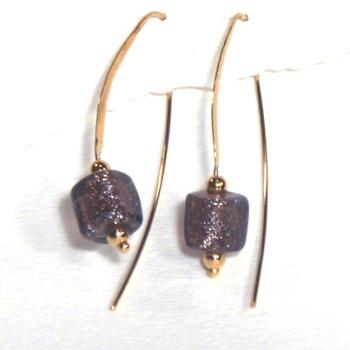
Shimmering Merlot ~ Sleek and Sophisticated Earrings
de Cielo Designs — jewelry with a higher calling! Proceeds from the sale of our handcrafted jewelry are donated to non-profit efforts benefiting children. You can also find them on etsy.
Just click the “edit profile” link on your dashboard!

1. Login to your store Headquarters and navigate to Store -> Shipping

2. Determine if you are going to charge based on weight or price and click the save icon. If you choose weight you will need to add weight values to each product. In this example we will choose price (weight works the exact same way).

3. Pick a shipping location and click the “+” icon to add it. This is what your shipping values will be for that location. In this example I picked “United States”.

4. Enter in what shipping rates you would like to apply per price range and click the save icon button. For example if you want to charge $5 shipping if the total cost of the purchase is between $0 – $20 then the range would be from $0-$20 and the rate would be $5.00.

5. Enter in the next shipping range and click the “+” button. In this example I want to charge $8.00 shipping if the total cart value is between $20.01 – $100.00.

6. Keep adding shipping ranges just like in step #5 until you are satisfied. If the shipping amount exceeds any shipping range that you haven’t specified then by default the highest range amount will be applied. For example in the example above if a customer has a total of $150.00 then an $8.00 shipping charge will apply.
7. Select another country to specify shipping ranges to and click the “+” button. In this example I’m going to pick Italy.

8. Repeat steps #4 and #5 for the new location

9. If you want to ship to any location pick the location “Everywhere”. The “Everywhere” location will be applied to any location you haven’t specified. For example if your specify shipping ranges for United States, Italy, and Everywhere and a customer checkouts out from India then the “Everywhere” shipping range will be applied. If the customer checks out from United States the United States shipping ranges will apply.