
Tips for Creating an Online Store

Posts Tagged ‘Marketing’

Marketing FAQ

Thursday, October 7th, 2010

Basic Marketing

Keywords are a way for your site to communicate with search engines, with the goal of helping to drive customers to your store. Fill out your site keywords in Marketing > Basic, and use terms that are most related to your topic. Try not to go crazy and spam up this field with a ton of keywords… choose a few really strong ones to focus on. But don’t worry too hard—this section isn’t actually as important as you may imagine.

Now, your website title is the most important element for considering keywords. After the title, shift your focus to the keywords section.

The best way to figure out which keywords to use is to ask yourself this question: “How do I want people using Google to find my store?” The more specific you can be the better. For example “Japanese Art Toys” is good but “Japanese Vinyl Art Toys by Immortal Beloved Toys” is even better.

If you simply want people to find your store by its name, than make that your website title. By default your website title is your store name. If you want people to find you by your top selling product, then make your website title the same as the title of your top selling product.

Advanced Marketing

This is the easiest way to make sure Google knows your store exists. Here’s a step-by-step guide to getting verified:

1. Go to Google Webmasters Tool website and login with a Google account.

2. Click on “Add Site”

3. Enter in your Flying Cart store URL (ex: www.MYCoolStore.FlyingCart.com) and click “Continue”

4. Select “Meta tag” for the Verification method

5. Copy the entire line of code they give you INCLUDING the brackets “<” and “>” and click on “Verify” towards the bottom.

6. Login to your store Headquarters

7. Click on the Marketing > Advanced tab

8. Scroll down to the “Google Verification Code” Section and paste in the entire line of code you obtained in step #5

9. Click “Update Settings” in your store headquarters

10. Click “Verify” in your Google Tools account

Google Product Search is a great (and free) way to get more exposure for your products. In fact, some merchants have reported an 800% increase in traffic when they submit their products to Google Product Search. Yes, that isn’t a typo… 800%!

You can watch our step by step video. Here is Part 1 and Part 2. (Video is also embedded below). Or you can follow our step by step written instructions below the video.

Part 1: Verify and Claim your store URL with Google

Part 2: Create you Datafeed and submit

By following these directions to create a product feed and a Google Base FTP account you will be able to submit your products to Google Product Search from within your Flying Cart Headquarters. We also submit your products automatically every 30 days so they never expire from Google.

Here’s how to do it:

1. Be sure you’ve completed the steps to verify your online store with Google in the Marketing > Advanced section.

2. Log in to your Flying Cart Headquarters and navigate to Marketing > Advanced Tools. Find your “Product Feed Filename” and write it down.

3. Go to Google Base and sign in with your Google account. Your Gmail email address will work. If you don’t have a Google account they will take you through the necessary steps for you to sign up for one. During the sign up process you will need to specify your location, agree to the Google Base Terms of Service, and enter in your account info (Business Name, Address, eMail, etc.)

IMPORTANT 4. List your website URL in Google Base settings. If you use a custom domain enter in your custom domain (not your .flyingcart.com domain).

5. Click on “Data feeds” and then the “New Data Feed” button.

6. Pick your Target Country, select your data feed type as “Googlebase”, and enter in your product feed file name (the one your wrote down in step 1).

7. Next you will need to create a Google FTP Account. Click on “Settings” and then “FTP”.

8. Create a FTP username and password. Write it down. Wait several hours for Google to activate your account. (Google says that it takes 15 minutes, but we have noticed that it usually takes 8 hours)

9. Log in to your Flying Cart Headquarters. Go to Marketing > Advanced Tools. Enter in the Google FTP username and password that you created in the previous step. Hit “Save Settings”.

10. You are now ready to submit your products. Click “Submit Products to Google”.

Enjoy your products in Google!

Having Problems?

Google product search definitely has a few quirks. If you are getting error messages. Please try the following

1. Go into your Google Merchant Setting (see Step #4 above) and make sure you put in the proper website URL. If you use a custom domain enter your web url in (ex. www.mystore.com). If you are not using a custom domain put in your Flying Cart subdomain (ex. www.mystore.flyingcart.com).

2. Delete your FTP password in Google and create a new one (Step #8 above), enter in the new FTP Password in the Advanced Marketing section of your Flying Cart store. Submit your Google feed after 24 hours.

Once you’ve completed the steps of creating a Google FTP Account, simply click the “Submit Products to Google” button.

An XML sitemap lets acts like a blueprint or road map for search engines. By using a sitemap, search engines can find all your products and URLs better and faster.

We’ve done all the hard work for you, so you can make a sitemap with a single click!
1. Login to your Flying Cart Store
2. Navigate to the “Marketing” Tab and click on the “Advanced Tools” sub tab
3. Click on the button “Generate Sitemap Now”
4. You are all set, your sitemap has been submitted and the Search Engines Google, Yahoo, and Ask know about it.

Let Google know about it. Lucky for you we let Google know about it every time you generate a sitemap.

Every time you add products or change any content on your store you should generate your sitemap. We also do this automatically for you every 30 days.

Chances are you created an online store to reach a large national or even global audience. However, there are those that prefer to shop locally to either promote local businesses or to pick up purchases locally to avoid shipping costs. In fact 60% of all searches on Google are local based!

To be visible on Google Maps search results you have to submit your business to Google Maps.

The following 6 steps outline how to submit your business to Google Maps:

1. Visit the Google Local Business Center
2. Sign in with your Google/Gmail account
3. Click on “+ Add a new listing”
4. Enter your location, website address, business description, and select the proper categories. Click “Next” at the bottom
5. Enter in your store hours, payment options, and upload a few pictures. Click the “Submit” button at the bottom when done
6. Verify your listing by following Google’s instructions

Marketing with Coupons

The coupon feature is available for any Flying Cart package from Helicopter and up. You can offer savings (as little as 5-10%) to dedicated customers, coupons are an excellent way to stimulate sales. If some products aren’t selling as well as you’d hoped, consider offering a coupon.

Coupons can boost your social networking presence and give back to your customers. Remind your fan club members, Facebook fans, Twitter followers and blog readers that you appreciate their time and offer exclusive coupons. For instance, if you create a coupon just for Facebook it gives fans a good reason to check your page often.

You can also use coupons to incentivize other bloggers or journalists to write about you. Create a coupon specifically for their readership.

First you will need to create them.

Go to Marketing > Give Coupons in your Flying Cart HQ.

Next, choose the type of coupon (percentage coupon or free shipping). A percentage coupon can be a specific discount like 5% that you give your customers off the total purchase price. The percentage discount will not be applied to any of your shipping fees. Free Shipping is just like how it sounds, your customers can type in that coupon code and it will give your customers free shipping.

For a new coupon, add the word to serve as the coupon code, then choose the corresponding percentage for the discount (not relevant if you selected free shipping). The coupon code can be anything like the name of a blogger, the product you are promoting, or a particular month. If you need ideas use our “Random” coupon code generator.

Coupons operate by the coupon code you created above. As your customers checkout at your Flying Cart store and enter in their discount code it will be applied to their total bill.

Yes! Simply specify the coupon code in your Fan Club newsletter and send away!

Anywhere you’d like. Spread word of the coupon over your social networking sites, pass it along in emails, put it on the back of business cards, make riddles out of it, whatever you can dream up. People love deals.

Once you’ve added a coupon, you’ll notice a list of active coupons below the Add New Coupon section. The red X in the far right column of the active coupon list allows one-click removal of any active coupon.

How To Get People Talking About Your Products

Tuesday, August 17th, 2010

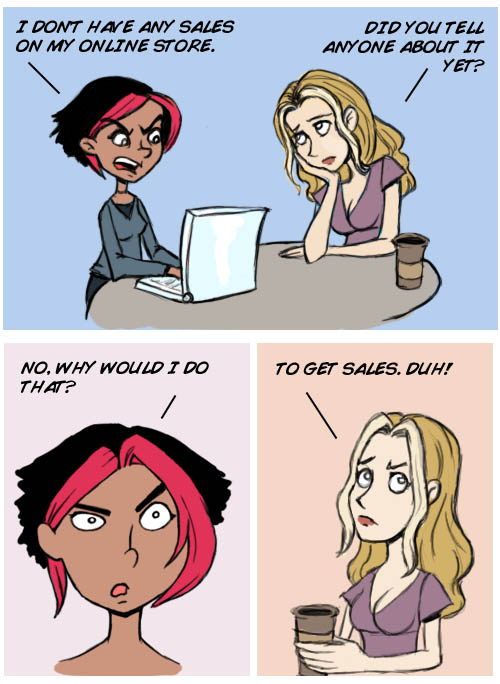
online-store-sales-comic

We’ve said it before and we’ll say it again: having an online presence is more than just having a website. It’s about spreading the word and putting yourself and your business out there. We always stress the importance of stuff like social networking and word of mouth, but one of the most effective ways to generate buzz about your business is to talk to the press about it. This is a tactic that a lot of new small business owners overlook, but it if you’ve got great products, then you’ve got nothing to worry about-they’ll speak for themselves.

Step 1: Research blogs that talk about your products

So you might not get the attention of a major news outlet (although that doesn’t mean it hurts to try) but you’ll probably have better luck reaching out to some mid-sized blogs. So do some research and build a list of blogs that might be interested in your products. Make sure when you choose blogs to reach out to that you’re as specific as possible.

For example, if you sell autoparts, don’t just contact every blog you find relating to cars. That’s too broad of a search and it might not really yield much for your efforts. After all a blog about new cars and car concepts might not be very interested in talking about car maintenance, repair or restoration. Instead try to find a blog that’s specifically about those kinds of topics. The audience may be smaller, but it’s the audience you want and the blog is way more likely to post about your products since it’s relevant to their readers.

technorati

So how do you find relevant blogs? Browse blog directories like Technorati and Blog Catalog. You can also just search Google for blogs relating to your topic and keywords and start checking out sites you find. You can even do a search for “Top Blogs About Blank” and find out what blogs other people are suggesting (replace Blank with your product keywords like “zebra purse”, “vinyl toys”, “cute stationary”). As you check out each new blog get a feel for how popular it is by checking out the comments, how often they update and if they have a Facebook page with a lot of fans. Narrow down your list to blogs that seem to have readers. But even if they don’t have an active community, you can see if they have decent traffic. Go to Alexa.com and get site info for these sites and find out their Alexa rank. Anything in the top 200,000 is a pretty popular site, and anything over a million probably doesn’t get a ton of traffic.

Step 2: Email the main blogger/editor

Once you have a list of 20-30 blogs (or more) relevant to your niche with a decent amount of traffic or a good sense of community, you can start contacting these blogs with information about your product. Introduce yourself and explain why you thought they might be interested in your product. Try not to just copy and paste a generic letter, but let them know why you’re interested in their blog and try to make a connection. If you feel comfortable you can even offer to send a sample product for them to check out. Bloggers love to get freebies and trial products and will usually be pretty happy to write up a review. It’s not necessary for you to send samples to every blogger you contact. In fact if you send samples to a few very popular blogs other smaller blogs may pick up the article and share it with their readers too. Try to build your list of contacts as you build your inventory. Bloggers who have featured your products in the past may be happy to get the scoop on a new product, so it’s not a bad idea to let them know about brand new products occasionally.

You can use the email format to reach out to bloggers:

Dear First Name of Blogger,

{Compliment the blogger. I love your blog and how you talk about X}.

{Introduce yourself and your product – I wanted to introduce you to my product X. It is awesome because X. I was wondering if you would be up for featuring it on your blog. }

{I can also give your readers an exclusive discount if they use the coupon code “blog-address” or send you a sample so you can see how amazing it is.}

{End with a no pressure line – Anyway totally cool if you don’t want to feature my product. Let’s stay in touch regardless.}

Your First Name,

Store/Website Link
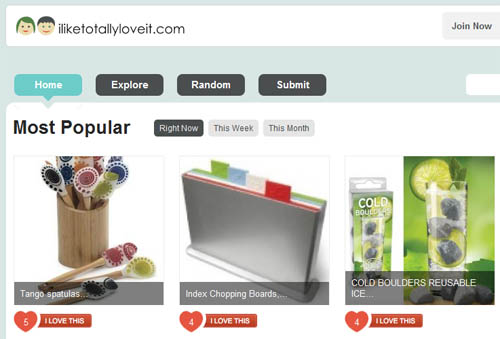
iliketotallyloveit

If you sell really original and cool products that can’t be found anywhere else online you may have great luck submitting them to product blogs like Incredible Things, The Awesomer, Outblush or Uncrate. You can also submit your products to ILikeTotallyLoveIt.com which is a website dedicated to sharing great products with shoppers who can vote on stuff they love and leave comments. Another site you can submit to is Stylehive. Just make sure that the stuff you submit is exciting, one of a kind and appeals to a broad audience. These types of sites are really meant for products that are unique and cool, so make sure your products fit the style of the site you are contacting.

65% of all Searches are Local!

Tuesday, May 19th, 2009

I just learned that 60-70% of all searches are local!

So now that we know that what should we do about it?

Advertise locally via Google. Go to Google Adwords and target your ads to a local area and in your ad copy write the city name.  Most local based business don’t advertise online so you can definitely use this to your advantage.

Feel free to ask me any questions on this strategy in the comments.

Twitter Tip: Talk to People that tweet about your product

Monday, May 18th, 2009

Talk to twitter users that are tweeting about the products you sell.  You can either search for your keyword on twitter via twitter search or auto follow people based on keywords using Twollo.

For example if you sell vegetarian vitamins search for the keyword “vegetarian vitamins” and jump in on the conversation!

Special Thanks to Anita at Small Bussiness Trends for prompting me to brainstorm about twitter and small business.

You have to see I Like Totally Love It

Wednesday, April 1st, 2009

iliketotallyloveitcomOMG!  You gotta check out this website.  People vote for the products they are totally in love with.  The products with the most votes hit the homepage.  I’m totally addicted to the site.  You should submit your products and/or products you are totally in love with.

How to Get Rid of a Cough

Monday, March 23rd, 2009

I just got back from a family vacation in Mexico.  I brought back sand, a sun burned face, and a mild annoying cough.

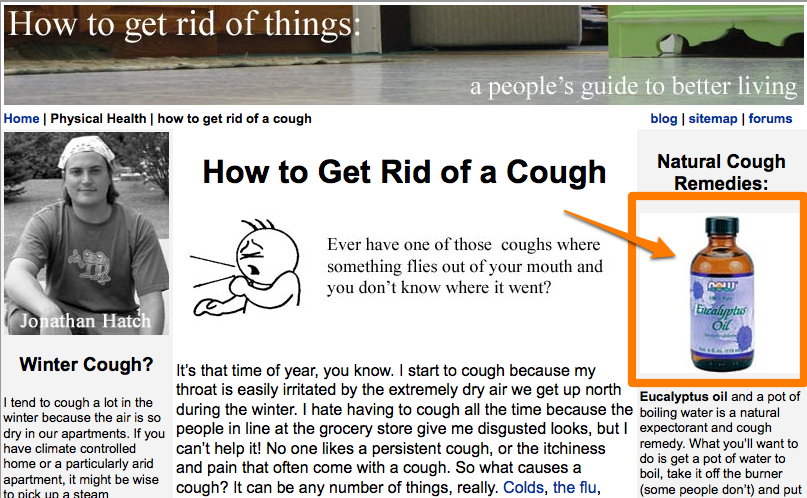
Sooo…  I googled “How to Get Rid of a Cough?”  The first link was this page with an article by Jonathan Hatch.  One thing he recommends is Eucalyptus Oil.

What did I do?  I bought Eucalyptus Oil.

If you sell a product that can help fix something.  Research and write about it on different sites like Get Rid of Things. Then recommend the product you sell.

Screen Shot of How to Get Rid of a Cough

Screen Shot of How to Get Rid of a Cough