Skip to content

Use your own email address: yourname@yourdomain.com

Google Apps LogoI love Gmail!  I think it is the best email service.  I go through at least 300 or so emails a week and Gmail makes my life easier.  Ok… I am done with my Gmail plug.

If you own your own domain, you can use Gmail technology to use your own email address (like bob@BobCeramics.com) with Google Apps - best of all it’s free for the standard edition!  All you need to do is sign up for the Google Apps Standard Edition and follow their steps.

FYI: The standard edition is all you need if you have less than 20 people in your company and you don’t mind the unobtrusive advertisements.  Feel free to checkout the premium edition if you need it.

Do they trust you?

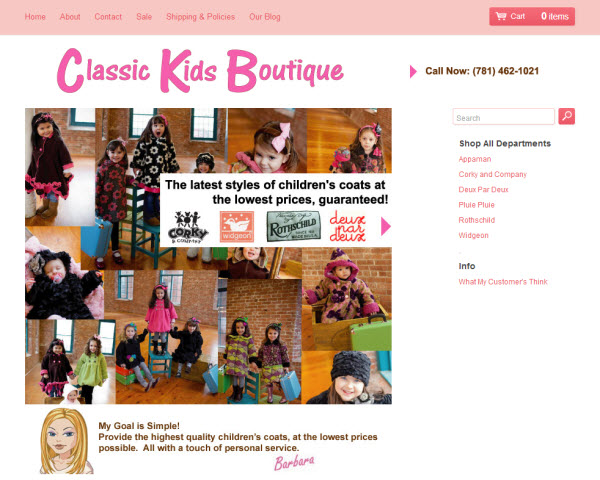
Every few days I get an email from a concerned customer.  They ask me if a certain store is legit and they want a little proof before they buy.  You are definitely loosing sales by not making your store look trustworthy.

Here are a few things you can easily do:

#1 List your email address on your contact us page or on your homepage.  Put your name in the email address.  For example Rishi@gmail.com sounds way more trustworthy than flyingcart@gmail.com.

#2 Accept Google Checkout and/or PayPal.  When an online store says they only accept money orders or western union I automatically think “This man is a scammer!”.

#3 Post a picture of yourself.  A real picture.

#4 Answer your emails.  When a customer asks a question all you need to do is simply answer it.

#5 Post a few customer testimonials.

#6 If your prices are too good to be true.  State the reasons why in your product description.

What are some things you do to make your store gain trust?  Would love to hear some of your ideas.

Fun + Folding: An Interview with The Good Envelope Party

The Good Envelope Party Our featured store this month is The Good Envelope Party, a collective that makes stationary out of recycled materials.  I interviewed founder Jenny Rask.

Margo: How did your group get started and how did you come up with the idea of using recycled materials to make stationary?

Jenny: We got started meeting as a group last spring. It started out as some of my neighborhood friends hanging out together socializing. Some of us have children so I felt like I wanted to create a reason to meet and socialize more often. I had been making my own envelopes for a while and it dawned on me that my friends might like learning to do it as well. We are definitely all multi-taskers. We can fold, drink and chat. We started making them for our local schools to sell at fundraisers to raise money for them. When more people joined the group we realized how many we could make in an evening and realized that as a monthly collective we could produce even more and use the money towards helping people in need. So a great equation of Fun + Folding = Helping Others.

The reason we use recycled materials is to give old books and magazines another life and to to reduce waste while demonstrating how easy it is to be creative with materials we all may already have in your home. Anyone can fold an envelope or make their own gift wrap out of almost anything. We aren’t reinventing the wheel here. We are hopefully demonstrating to the consumer that we don’t have to buy “new” from new resources, that beautiful products can come from being resourceful with everyday things around us.

Margo: Can you explain a little about how a collective works?

Jenny: Well we all are very motivated in helping others who are in need. So that is really our common goal when we come together for this party. We really felt that if we could help one person or one family locally and directly that it would be incredible! So during our party we vote on short term goals who we would like to help the most immediately and then vote on long term ideas, who we would like to see receive our money in the future. The more stationery we sell obviously the better for whoever is the recipient of the money. We also vote on how much money we will donate for each cause.

So there is a lot of voting and then I help manage and guide the group a lot about where our stuff will be sold in shops, manage the online store and work with the daily orders. I source the materials we use too. We love donations of salvaged books and magazines with great full page photos or illustrations in them as well : ) 12 inches at least in height please!!!

Our meetings are really a fun party. It really is about having a laugh, hanging out together, helping others and building community. We welcome newcomers in our area. The stationery is our way of giving back to our community through maybe a little bit different approach.

Margo: Your site says that you donate all your profits to charitable organizations. How do you choose where to donate?

Jenny: We cover our costs first with the money which are fairly minimal and then the rest of the profit is saved until we have a recipient we agree on and have the sum of money saved in our account that we agree on. We vote on the recipient at our party. We have not yet donated as our store is new and profits are just finally coming in. We have voted on who will receive the first money though and it is someone local.

Margo: How did you sell your stationary before you started your online store with Flying Cart?

Jenny: We used to donate it to school fundraisers and had our stationery in a local store in L.A. called O.K. on 3rd Street.

Margo: In a very short time, you are having amazing success with sales and have a nice fan following. What have you done to get the word out about your store?

Jenny: We are so lucky! Being published in Daily Candy has been a huge help : )

Margo: Tell me a little about your blog and about some of the other projects you are working on.

Jenny: Well, let’s see. Ask WoollyM. (www.askwoollym.typepad.com) is an eco-friendly help site that I started last year. I am a mom of two kids and had been researching living more sustainably and toxin free since they were babies. It really inspired me to help others because there is so much information out there and I wanted to take a guilt-free user-friendly approach to it.

My friends kept asking me about their toxin concerns in their daily lives so it seemed kind of like a fun idea to help them by creating this and maybe help anyone else who might need a head start on their green path. I started this site to test the waters a bit and see how I might be able to contribute in this way. It is a question and answer site. So anyone can ask a question and I will research the question and post the a personal solution with my research. It is an amazing way to learn about other’s needs in this area or what their concerns are. Kind of like going to school again, but on my terms.

I am working on a few other eco-education projects that will hopefully be accessible online soon. They are coming from a different angle than other “How to live green” approaches. Hopefully the projects will be entertaining and educational.  Check out www.theguidegirls.com in a couple weeks.

Meet some real people with Meetup.com

meetup.com Most of us are guilty of spending a little too much time online. It’s so easy to do. And some of us have gotten to the point where we might even be guilty of spending more time with our computer than with actual humans (sadly I think I fall into that category).  Meetup.com is a site that helps you get out and meet real people in your area that share your interests.

I started browsing the groups here in Austin and found so many interesting ones that I wouldn’t even have time to go to them all. Some of the ones I found interesting were the Austin Progressive Vegetarians, the Community Sewing Project (donate everything they make to hospitals), Austin Bookcrossing, the Austin Happy Campers, and the Austin eBusiness Brunch. There is really something for everyone, no matter what your interest.

Score one for the Internet.

Need better packaging ideas?

The DieLine Logo

Check out The Dieline for great ideas on how to package your product.  They show off some of the best packaging designs I have ever seen!

Strawberry Organic Juice Awesome Packaging

Cleavage Cupcakes

Furoshiki

My favorite part of the blog is the before and after section where they show you ways companies have improved their package design.  It really makes you think of ways to improve your design.

Bounce Packaging

If you have new innovative packaging.  Show your stuff off by submitting it to them.

New! Google Checkout and Lots More

We are very excited to show off what we have been working on for the last month. A lot of love and elbow grease went into this.

Google Checkout is Here!

You asked for it, and we now bring you an alternative to PayPal. Process credit card payments using your Google account. Solid and reliable. Yippee!  Go to your Store > Settings tab to set this up.

Why we love Google Checkout:

  • Its cleaner and easier to process payments
  • More reliable (did we mention that?)
  • If you advertise on Google (via Google Adwords) they will display “Google Checkout” under your ad

Using Google Checkout with Flying Cart is easy. Here are our step by step instructions.

Orders Nearly Manage Themselves

Well not quite, but close. Orders now have a nice little three-step process with matching icons:

  1. Get Paid - shows you when the payment is in your account
  2. Ship - click the icon when you have shipped the order
  3. Archive - file the order in your archive to get it out of the way

    That’s Not All

    • Order numbers now correspond to your PayPal or Google Checkout order number
    • A PayPal or Google logo on each order shows you how the customer paid
    • Your customer’s billing information is displayed below the shipping information
    • You can send email notifications to tell your customer that you shipped her/his order (see the Store > Settings tab)

    Expanded Options for Charging Tax

    You know what they say about death and taxes. Yep, inevitable.

    In most states you only have to charge the customers in your state. Now you can easily apply a percentage to the total for customers in your state.

    Simplified Shipping Page

    Our old shipping page was a little confusing so we changed it around to be more straightforward. ‘Nuf said.

    Subscribe to our Blog via Email

    Get all of our latest news in your email. Keep in touch with our growing community. Read about our newest features and don’t miss out on our tips about how to improve your store and how to run your online business.  Plus, enjoy Rishi’s goofy humor :)  (He did start a joke club in college by the way.)  Sign up here.

    WYSIWYG HTML!

    What You See Is What You Get. I just added a graphical HTML editor in the Flying Cart Headquarters so you can add style to your site without knowing any HTML.  Take a look for it on the pages where you edit your Homepage, About page, Return policy, and product descriptions, to name just a few.  You can change the font, size, and color of your text, add bullet points and images, and more.

    The new editor is a free Open Source web plug-in called TinyMCE. It is so easy to use and useful, I can’t say enough good things about it.  Have fun.

    TinyMCE HTML Editor

    Now everyone, it’s election day so don’t forget to vote! Let’s bring in some positive change.

    NOTES TO ADVANCED HTML USERS

    1.  You can still write your own HTML by clicking on the “HTML” button on the toolbar and entering your code in the popup window.

    2.  Any existing HTML tags (that you entered before this feature was available) that are visible in the editor window will display as raw HTML tags on your page if you save changes. TinyMCE will convert all HTML tags to HTML escape characters. This is probably not what you want. To avoid this problem, you can either copy and paste your exising code into the HTML code window, or you can redo your formatting using the graphical editor.

    Free Web Based Photoshop

    Checkout Pixlr.  If you want to simply retouch your images but don’t want to buy Photoshop.  In minutes you can upload your picture and modify.

    Here are somethings I would use it for:

    - Adding text to images (like your website name)

    - Reducing the image size

    - Cropping out the background

    Backgrounds - I love them

    I’m a really big fan of stores with background images.  It adds a ton of personality.

    Here are some really great websites that offer really cool looking background images for free:

    Din Pattern

    Din Pattern

    Fading Background Images

    Fading Background Images

    Everyday Icons

    Payground Images

    How do I setup Google Checkout?

    Google Checkout LogoGoogle Checkout allows you to accept credit card payments using a (free) Google account. In our experience, it is easier to use and more reliable than PayPal for a nearly identical functionality. Read more about Google Checkout here.

    Follow these steps to use Google Checkout on your store.  Feel free to download and print these instructions out.

    1. Sign up for a Google Merchant account.  It is free and easy.

    Please Note: Google will make a small deposit in your bank account and you will need to verify the amount in order to complete your sign up.  This will take a day or two.

    2. Login to your Google Checkout account and go to “My Sales”. Click on the “Settings” tab and then click on “Integration” on the left.

    Google Checkout Settings tab

    3. Make sure “My company will only post digitally signed carts.” is unchecked.

    Google Checkout Digital Signage

    4. Locate your Google merchant ID and Google Merchant Key on the right side of this page.

    Google Merchant ID

    5. Login to your Flying Cart store headquarters (in a new browser window).  Go to your “Store” -> “Settings” tab.  Scroll down to the Payment section and enter in your Google Merchant ID and Google Merchant key that you got from Step #4.

    Add Google Merchant Key

    6. Highlight your API Callback URL from the Google Checkout section and go to Edit > Copy in your browser to copy it. Scroll down the page and click “Update Settings” at the bottom.

    Google Checkout API Callback URL

    7. Go back to the window with your Google Settings and paste the API Callback URL into the field on that page.  Select “HTML (name/value pairs)” as the callback method.  Hit “Save”.

    8. Go to your store, put something in your cart and notice that Google Checkout is now an option. Enjoy!

    Google Checkout