Monday, May 19th, 2008 by rishi
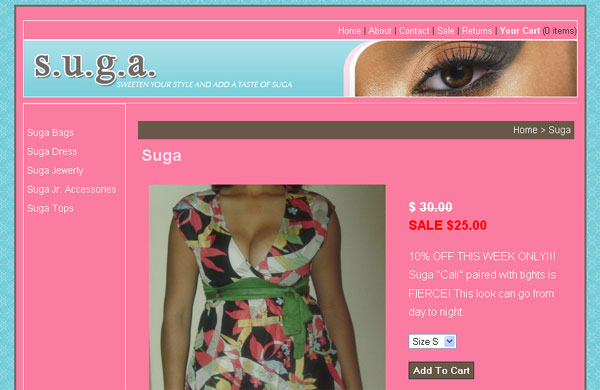
Now you can add multiple pictures for each product. Show all the angles, zoomed in photos, different colors and styles.

Here is How it Works:
1. Login to your headquarters and upload your images on the product page.
2. Set a primary image. This is the image that will be displayed as a thumbnail on your homepage, department, and brand page. *Optional
3. Link up your images to specific variations. For example if you have a t-shirt available in green and blue match the green variation to the green t-shirt picture. This way the image on the customer receipt and cart will match up. *Optional
I’m really excited to see how all of you use this feature.
Wednesday, May 14th, 2008 by rishi
I discovered a really fun Web 2.0 logo creator last night. Play around with it for a little while if you want to spice up a simple textual logo.
Saturday, May 10th, 2008 by rishi
PayPal Express Checkout is a service that allows your customers to pay using a PayPal account instead of a credit card. They can make purchases without entering billing, shipping, and credit card information since that information is already stored with PayPal.
Does it cost extra to use PayPal Express Checkout or do I need a special account?
PayPal Express Checkout can be used for free with any
PayPal Business account, which you must have anyway in order to use eCommerce in your store.
How do I activate PayPal Express Checkout in my store?
1. Log in to your PayPal Business account.
2. Click the Profile subtab located in the top navigation area and then “More Options”
3. Click the API Access link under the Account Information header.
4. Click “View API Certificate” under Option 2
5. Copy your API Username, API Password, and Signature and enter it into your Store Headquarters.
Thursday, April 24th, 2008 by rishi
As of 4/24/08 they support:
- Canadian Dollars
- Euros
- Pounds Sterling
- U.S. Dollars
- Yen
- Australian Dollars
- New Zealand Dollars
- Swiss Francs
- Hong Kong Dollars
- Singapore Dollars
- Swedish Kronor
- Danish Kroner
- Polish Zloty
- Norwegian Kroner
- Hungarian Forint
- Czech Koruna
More details located on this PayPal support page.
Monday, April 21st, 2008 by rishi
Margo is running the Boston Marathon today! Check out her timing here.
Sunday, March 23rd, 2008 by rishi
We hate to see you go but we understand that sometimes you just need to cancel.
1. Click on “My Account” located at the upper right hand corner
2. Scroll down and Click on “Please cancel my account.”
After canceling, your store will no longer be active and you will never be billed by us again. Please contact us if you need us to re-activate your store. We do charge a 1 time $60 re-activation fee for our time.