Tips for Creating an Online Store
Land of Make Believe Fine Art
Friday, February 5th, 2010 by rishiThe iSwim Store
Thursday, February 4th, 2010 by rishi

Zack White Art and Design
Thursday, February 4th, 2010 by rishi

Pants on the ground craze has hit Flying Cart
Wednesday, February 3rd, 2010 by rishi
The Kabir Project Documentary
Wednesday, February 3rd, 2010 by rishi

The Kabir Project just launched a full documentary. Check it out.
Export Your Fans
Friday, January 29th, 2010 by rishiWe just added a new way for you to connect with your fans! In one click you can now export all your fans contact information.
Give it a whirl.

PS: You can take this list of fans and follow them on Twitter 
Aylio uses Google TV Ads
Tuesday, January 5th, 2010 by rishiAylio just launched a national TV ad campaign using Google TV Ads.
I asked Max (CEO of Aylio Fitness) how he pulled this off. Here is what he said:
Find a production company that will create your commercial. The ad must be must be 15, 30, 45, 60, 90, or 120 seconds. Once you have the video, you may upload it to Google TV Ads. It will take about 48 hours for approval of the technical specs, content, and basic quality of your ad. Once approved, you are ready to bid on ad spots. Choose the networks and time slots you wish to target and place a bid on what the CPM for each spot is worth to you. The CPM is your cost per 1,000 impressions. If you win the auction for the spot, you will normally see your commercial air on TV the following day.
How do I send out coupons to my fans?
Wednesday, December 9th, 2009 by rishiTracey of It Girl Nail Decals just asked “How do I send out coupons to my fans?”
Thanks for the great question Tracey! Here is how you do it.
Create a Coupon
1. Going to the “Marketing” -> “Give Coupons” section
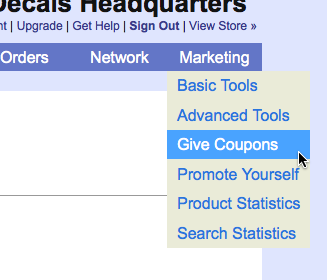
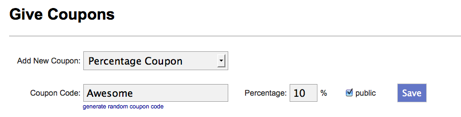
2. Pick a Coupon type “Percentage Off” or “Free Shipping”. In this example we are going to do a “Percentage Off” coupon for 10% if they type in “Awesome” and we are going to a make it public (public coupons get displayed off our homepage). Hit the “Save” button to make your coupon active!
Send a Newsletter
3. Go to “Network” -> “Mail My Fans”
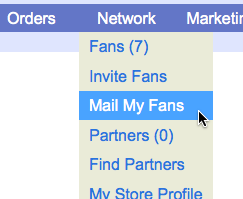
4. Enter in a subject, pick a greeting, and send them a message. Make sure the message tells your fans about your coupon!
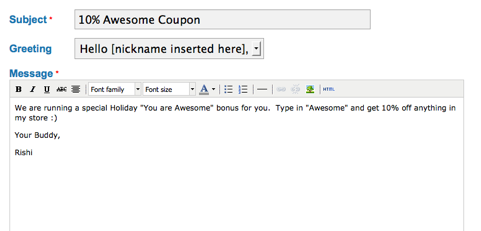
Click on the “Mail My Fans” button at the bottom and your coupon will be sent to all your fans!
Is there a way to duplicate an item I have already set up?
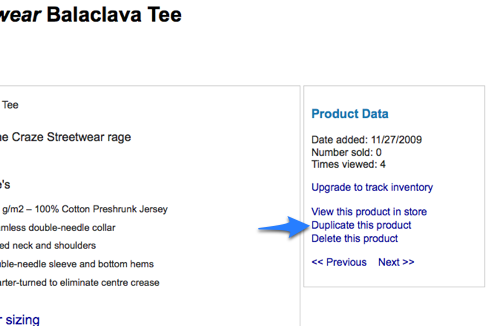
Monday, November 30th, 2009 by rishiYes you can easily duplicate products. If you are listing multiple products that are pretty similar use our Duplicate button.
When you click on “Duplicate this product” a new product is added with the exact the same Title, Description, and Images added in. At this point you can easily make a few edits to the product.
How to Add and Use Sizes
Thursday, November 12th, 2009 by rishiAdding Sizes
1. Login into your store headquarters
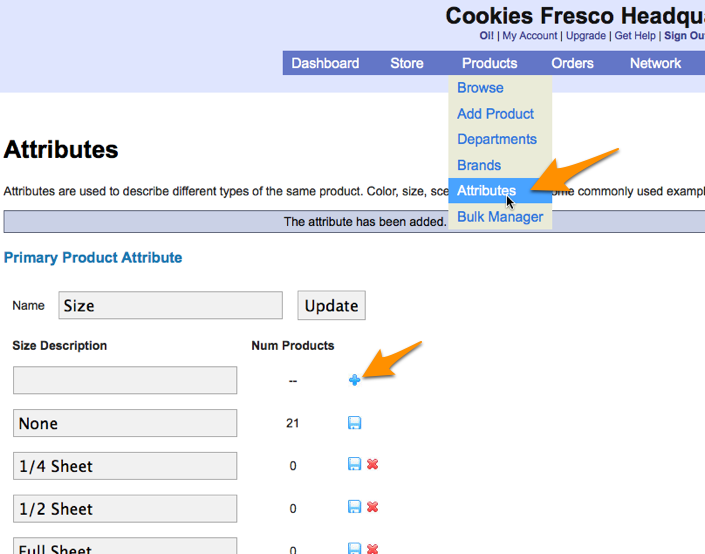
2. Going to the Products -> Attributes section
3. Enter in the size you wish to add and then the blue “+” symbol next to it
Using Sizes
Once you have added all the possible sizes in you will need to add them as options in each product. You can do this by
1. Login into your store headquarters
2. Go to one of your products by clicking on “Products” in the main navigation
3. Click on the product you wish to edit
4. Scroll down and click on “None” next to size. (None is the default size) Pick the size that is appropriate for the product.
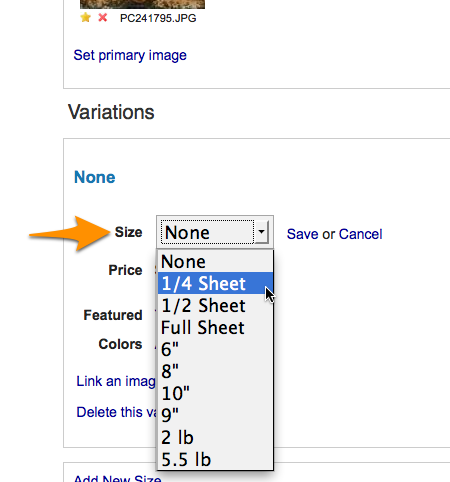
5. Click “Save”
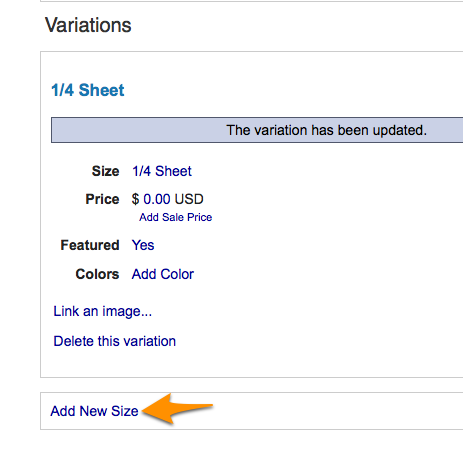
6. To add a new size click on “Add New Size” and repeat the process.