Saturday, December 6th, 2008 by rishi
PJ of Immortal Beloved Toys is putting on a Show. He invited artists to paint on his toys and display them.
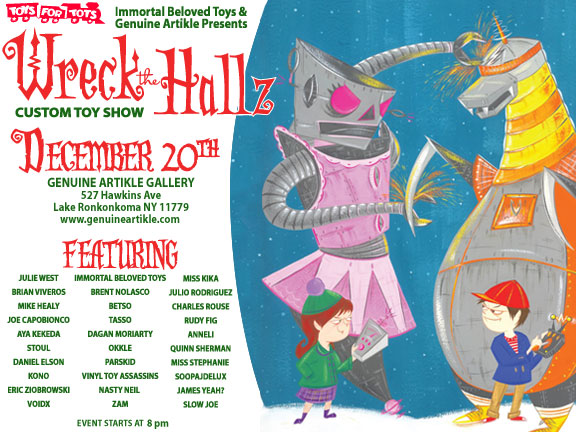
I asked him how he pulled this off! This is what he said:
“I searched galleries all over the world via the internet. I then hand selected who I would like to be in the show. From there i offered each artist a chance to do a custom toy. I ordered about 35 blank toys. I explained to each of the artists that i am only a small mail order store and so they need pay up front. So after I got the list all worked out i went to this new gallery that one of my friends opened and offered him a chance to hold what some of the toy websites are calling *possibly one of the best shows of the year*. So i expect that most of the sales will come off the site, not at the actual gallery itself. so with a lot of begging and pleading and promoting, here we are! So basically anyone with a product on their site can offer a little more with asking someone to do a special one of a kind piece  ”
”
If you are in the New York area – Go check it out!
Nice job PJ! Please let us know how it went.
Friday, December 5th, 2008 by rishi
Each month we choose one outstanding store to be our Store of the Month. This store is featured at the top of our homepage for the whole month, gets a permanent spot on our featured stores page, and is interviewed for a blog post. Sound good? We choose stores that we believe show great potential for becoming successful businesses (or already are). Here are some things that we like to see:
- A creative and unique design with customized logo
- A complete selection of products that are well-organized within departments
- A fan club with over 10 members
- An interesting niche concept
- A sales history
Do you want to be considered? Send us an email telling us why your store stands out.
Thursday, December 4th, 2008 by rishi
I’m excited to announce our latest feature, which will be useful for both eager shoppers and for store owners looking for some free marketing. Link sharing lets people post products from any Flying Cart store on their Facebook, MySpace, StumbleUpon, and Twitter accounts. Once a product is posted, it is seen by all of the person’s friends. Then the friends click the link to come visit the store. It’s a fun way to shop and a simple but very powerful marketing tool.
Look for the link sharing icons on product pages just below the “Add To Cart” button.

How does it work? For example, if I find a product I like such as the Tokidoki Kaniza from Immortal Beloved Toys, I can click on the Facebook icon (third from the left) to show all my Facebook friends. A screen pops up with the product information and I can add a comment. Then I click “Post” and I am done.
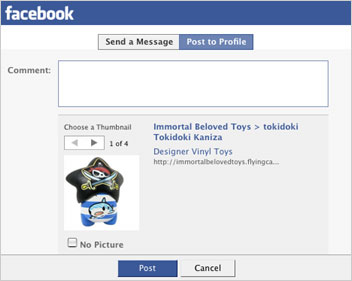
Link sharing can be turned off on the Store > Settings page when logged in.
Tuesday, December 2nd, 2008 by rishi
 All business pray for press, well stop praying and subscribe to Help a Reporter Out. Peter Shankman sends out daily emails where reporters are looking for stories. This is how we got Flying Cart into the New York Times and Gaebler.com.
Just the other day a reporter wanted to do a story about green laptop notebook cases, just imagine if you were a store selling these. It does take time and little bit of effort but in the long run it is totally worth it.
Saturday, November 29th, 2008 by rishi
Here is a quick tip. If you own a custom domain register it for at least 5 years. Google favors websites that have been registered for 5 or more years. It shows them that your website will be around for a while.
Wednesday, November 26th, 2008 by rishi
We see things that work and we want to share them with you to help you grow your business.
That is why we are holding our very first community call. All you need to do is leave your store name in the comments and I will email you the phone number to call and pass code. Feel free to leave any discussion topics you would like me to address on the call as well.
What? Conference call about marketing your store, additions to Flying Cart, and discussion topics from the comments
When? Wednesday, Dec. 10th at 8pm CST
Cost? FREE
How Long? 25 minutes
How do I attend?
1) Leave your store name in the comments
2) I will send you an email with the phone number you need to call and a pass code to get in
3) Call the number in the email on Wednesday Dec. 10th at 8pm
Monday, November 24th, 2008 by rishi
Last week I met Ted. He started Powered Green. You can buy a sticker for your laptop that goes towards buying a new wind turbine. The wind turbine produces the amount of energy an average laptop needs in its life time. Here is how it works.
Anyway… I bought one. A day later Ted emails me asking if I can send him a picture of me and my powered by green laptop to post on their website. Of course I was pumped and excited! I sent him my picture and he posted it.

I thought this was a great idea! Post pictures of your customers using your product! This can be easily done with flickr or slide – Let me know if you are interested on a “How To” post about this.
Why I like it:
- The best customer testimonial you can get is a picture of your customer smiling and using your product
- It shows a sense of community
- This will get your customers involved and excited to be a part of your business. Customers will be exited to show it off to their friends.
Friday, November 21st, 2008 by rishi
 If you are a photographer and want to protect your pictures. Try adding a watermark to the images you upload to your store. An easy and free tool is PicMarkr.com.
In 30 seconds I was able to add “Rishi’s Cup Cake Studio” to the picture.

Thursday, November 20th, 2008 by rishi
I just saw the coolest flyer. You see all the information about their biz on the front (typical flyer, nice and colorful).
Then the magic happens… you flip it over and BOOM a postcard! I scanned it in to show all of you.
FRONT:
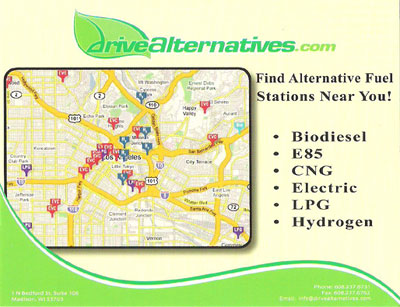
BACK:
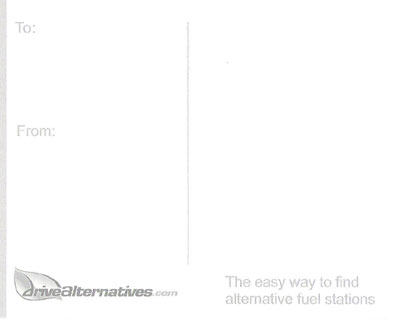
Why I love it sooo much:
- It gets you to tell a friend about it (by sending it to them)
- It is green (goes with their theme of their project)
Also check out their project. Pretty cool stuff – DriveAlternatives.com
I will send this postcard to the person with the best comment.
Wednesday, November 19th, 2008 by rishi
Several of you have emailed to tell us that there isn’t a category in our list that fits your store. Agreed! We definitely needed some finer categories, and now we have them. This new list should allow you to set a category that better describes your store. Here is the updated list:
- Arts and Crafts
- Automotive
- Baby
- Bags and Purses
- Bath and Beauty
- Books and Zines
- Business and Industrial
- Candles
- Clothing
- Collectibles
- Computer
- Electronics
- Fashion Accessories
- Fine Art
- Food and Drink
- Furniture
- Garden
- Holiday
- Housewares
- Jewelry
- Toys
- Knitting
- Media
- Miscellaneous
- Music
- Novelty Items
- Pets
- Scrapbook
- Sports and Fitness
- Vintage
- Wedding
You can assign a category to your store on the Network > My Store Profile tab in the Headquarters.
Does anyone have any suggestions on what else we could add?
