
Video of me explaining why you need to put your business on Google Local Business Center now!
Tips for Creating an Online Store
[Video] Google’s FREE Local Business Center
Friday, June 12th, 2009 by rishiHow do I delete a fan?
Monday, June 8th, 2009 by rishiI get this question a lot. The answer is that store owners can’t delete fans. If you are a fan, you can choose to remove yourself from being a fan of a store or you can delete your account. Here’s how to do it:
1. First log in to a Flying Cart store with your fan login.
2. Click on Profile to view your fan profile.
3. To remove yourself from a store fan club, click “Edit my Profile”. Then scroll to the bottom where all your favorite stores are listed and click on the red X button next to the store that you want to remove.
4. To delete your whole fan account, click “Delete my account” at the bottom of the page.
Did you know…? Everyone with a Flying Cart store can use their account login to log in to the fan club of any other Flying Cart store. There is no need to create a separate fan account if you already have a store account.
Store uses own website to sell products from Flying Cart account
Wednesday, June 3rd, 2009 by rishiRobeco Clarete of Pinoy Culture (www.pinoyculture.ca) came up with a way to use his own website to sell the products from his Flying Cart store. That’s right – his own site hosted on his own server! He gets the flexibility of using his own site design, but also has all the benefits of using Flying Cart to manage his sales and market his products.

PinoyCulture.ca PreSchool department
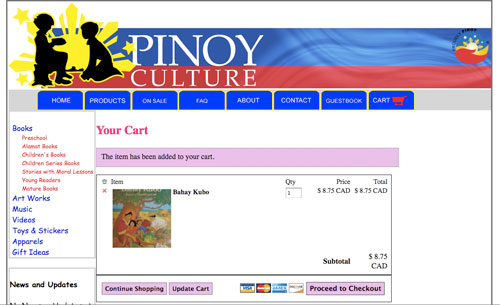
PinoyCulture.ca Shopping Cart
Really?
The design at the top and the sidebar are Robert’s own. The middle section of the screen contains the content of his Flying Cart store.
How does this work?
Robert’s solution is very clever and requires some technical knowledge to implement. In a nutshell, he used the Flying Cart custom CSS feature to hide all the page elements other than the products. Then, he made a department navigation menu on his own site and linked to each department page in his Flying Cart store using the javascript “loadintoiFrame()” command. These links are targeted into an iframe in the center section of his site. This creates a seamless interface and most customers won’t have a clue that the ecommerce comes from a hosted solution.
The Flying Cart team is entirely impressed with this creative way to use the software.
Google Base Update – ACTION REQUIRED
Monday, June 1st, 2009 by rishiGoogle Base now requires you to add in your location. This is an effort to make their search engine local friendly. In the next 30 days you need to login to your Google Base account and enter in your location and accept Google’s new terms of use or your account will go inactive.
Read more about the changes on the Google Base Blog.
65% of all Searches are Local!
Tuesday, May 19th, 2009 by rishiI just learned that 60-70% of all searches are local!
So now that we know that what should we do about it?
Advertise locally via Google. Go to Google Adwords and target your ads to a local area and in your ad copy write the city name. Most local based business don’t advertise online so you can definitely use this to your advantage.
Feel free to ask me any questions on this strategy in the comments.
Twitter Tip: Talk to People that tweet about your product
Monday, May 18th, 2009 by rishiTalk to twitter users that are tweeting about the products you sell. You can either search for your keyword on twitter via twitter search or auto follow people based on keywords using Twollo.
For example if you sell vegetarian vitamins search for the keyword “vegetarian vitamins” and jump in on the conversation!
Special Thanks to Anita at Small Bussiness Trends for prompting me to brainstorm about twitter and small business.
Network Solutions Custom Domain Name Instructions
Saturday, May 16th, 2009 by rishiFollow these instructions if you own a domain with Network Solutions.
1. Login to your Network Solutions account.
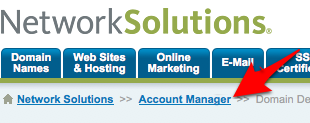
2. Click on “Account Manager”
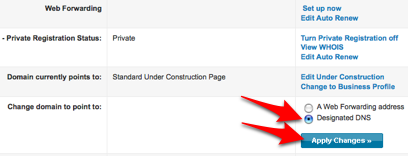
3. Scroll Down to the page and select the “Designated DNS” radio button and click the “Apply Changes” button
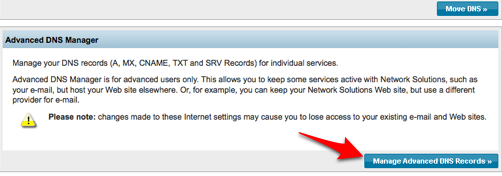
4. Scroll down the page and click the “Manage Advanced DNS Records” button
5. Click on “Add/Edit” under “Host Aliases (CNAME Records)”
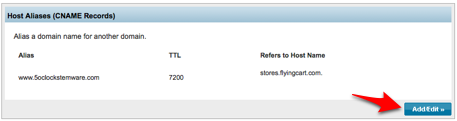
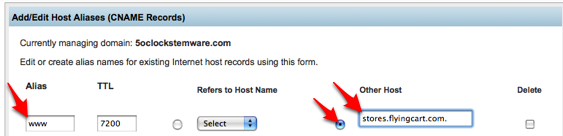
6. Type in “www” for the alias, select the radio button next to “Other Host” and type in “stores.flyingcart.com” and click on the blue “Continue” button at the bottom.
7. Login to your Flying Cart store headquarters
8. Navigate to the Store -> Settings tab and locate the “Website Address” section on the page
9. Type in your domain name under “Use your own domain:”
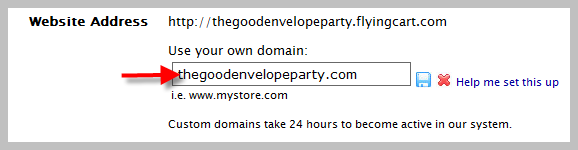
10. Hit the “Update Settings” button towards the bottom.
11. Wait a full 24 hours
Change the order of departments
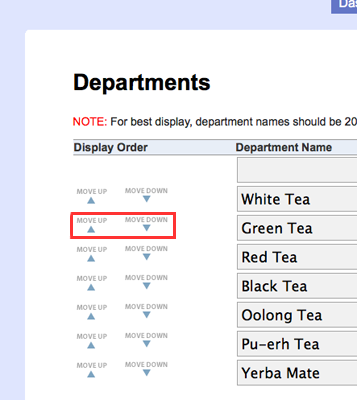
Friday, May 15th, 2009 by rishiYou can now change the order that departments are listed in your store. Log in and go to the Products > Departments page. Each department has a “Move Down” and “Move Up” button next to it. Use these buttons to organize the list in the exact order that you want it to be displayed in your store.
Hot off the press: Store Search Box!
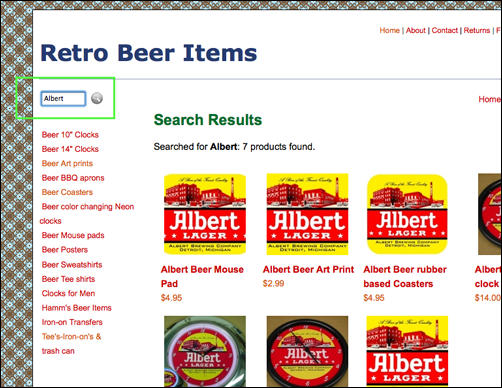
Monday, May 11th, 2009 by rishiIt’s been in the works for a long time and we’re happy to announce that our newest addition is a search box in each Flying Cart store. This should help your customers find exactly what they are looking for. You can find the search box above the list of department names on the left side of the screen in your store. Search results come from the following fields (in order): product name, product description, department name, brand name, item number. You may want to tweak the content of these fields to improve your store search results.
In the following example, I searched for “Albert” at Retro Beer Items (retrobeeritems.flyingcart.com) and it brought back seven related products. Cool!
This has been one of our most requested features ever.
To Launch or Not To Launch? How Viral-Tees got it’s first sale.
Wednesday, May 6th, 2009 by rishiThis guest post is written by Clayton Johnson of Viral-Tees.com
To Launch or Not To Launch? How Viral-Tees got it’s first sale.
Developing a business takes an incredible amount of time. Viral-Tees has been brewing for at least a year with no launch, but when an opportunity struck we decided to launch even with only 1 design and it paid off! Here’s a short synopsis of our situation:
President Barack Obama’s acceptance to be the commencement speaker at Notre Dame this year has created quite a controversy on campus. Activist groups threatened to protest at this year’s graduation in opposition to Obama’s stance on abortion (ND being a Catholic Institution). However, some 95% of seniors are in support of Obama speaking at the graduation ceremony according to the responses received in the student newspaper, The Observer.
A friend of Viral-Tees (a student at ND–Matt Degnan) decided to make a statement by ordering shirts that read plain and simple, “Obama? Fine by Me.” The campaign went viral. Hundreds were sold on campus. When an article was run on the story by the student newspaper, viral-tees.com got a plug which then generated our first order! (and many subsequent).
Taking the chance to launch unfinished has actually sped up the process of the business. Many missing functions of the business have been developed by necessity and Flying Cart has made much of this possible by making selling online so easy!
About Viral-Tees
Viral-tees is owned exclusively by Identity Custom Imprinted Sportswear, a 30-year veteran to the screen printing industry. We do wholesale screen printing and embroidery located in Mundelein, IL (NW Chicagoland).
Our website: www.identitycustom.com
Phone: 847-949-8337
email: clayton AT identitycustom DOT com